

Frequently Asked Questions
Browse our FAQs below - please don't hesitate to contact us if you can't find an answer to your question.
Product Specific FAQs
-
+ Which Mats work best with an optical mouse?All of our mats are optical mouse friendly. This means that they are suitable for use with most optical LED mice as well as the traditional ball mouse. Any limitations are noted on each product page and you can request a sample of any mat to check against any specific hardware.
-
+ Can you supply custom shape or sized mats?This depends on the mat style. Where custom shapes are available the product page will indicate this. Please note that custom shapes are subject to minimum order requirements and may incur additional tooling charges..
-
+ How does design complexity and pricing for custom moulded PVC products work?For custom moulded PVC products the price is based on the complexity of the design, rather than number of colours as with other custom branded products. The prices we show are based on a design of average complexity - so the sort of designs we see most often. The exact cost will be detailed on your quote but very intricate or detailed designs are likely to cost more than simpler ones.
-
+ What are the mould charges mentioned for some PVC products?A mould charge is a one off charge to create a mould required for certain PVC products and is charged as part of an initial order for these items. When you place a re-order the same mould is used and therefore no charge would be made. This is separate from setup and origination costs which are included in our prices. Where a mould charge applies this is always stated alongside our prices.
-
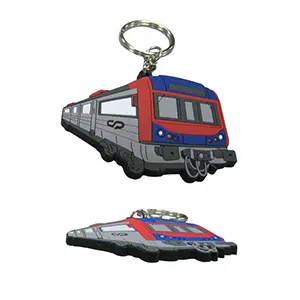
+ What is the difference between 2D and 3D PVC products?2D embossed products have embossed elements raised by the same amount - so there can be different layers to the design but each layer will be flat. The Train keyring below shows 2D embossing.
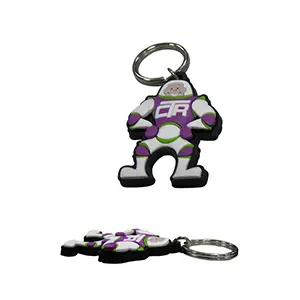
3D embossed products can have the embossed elements raised by different amounts - so layers can have curves or rounded elements. The keyring below shows 3D embossing.
Ordering
- + What are your lead times between ordering and delivery?Lead times vary between products and are shown on each product page. The quoted lead time is taken from the point at which you confirm and pay for your order and approve pre-production artwork/proofs (if applicable).
- + I've got a very tight deadline, can you help?Please contact us to discuss your specific requirements. Obviously customised products have to be specially manufactured but we may be able to provide a faster turnaround if we have an available production slot.
We will always advise prior to order confirmation if we cannot meet a deadline, but delivery delays can occur ,including but not limited to, courier delays, weather delays or access problems at the delivery location, particularly on urgent/fast-tracked orders that have little or no contingency.
The risk for late delivery on urgent orders will be borne by the customer.
Urgent orders are considered to be any order with a deadline:
a) 2 weeks or less for all custom lanyards (not including PANTONE Matching),
b) 3 weeks or less for woven lanyards,
c) As advised on other custom items,
FROM the date of artwork approval by the customer. - + Do you have minimum order quantities?Yes. Minimum order quantities vary from product to product and are listed alongside each product in our catalogue. We do try to keep minimum order quantities as reasonable as possible.
Minimum order quantities are per design.
We also carry unbranded versions of some products, available in low quantities, which may be suitable for your particular requirements. - + Do you provide samples prior to ordering?Yes. We are happy to provide samples for the majority of the products we carry. You can request samples by using our sample request page. Please note that samples cannot be customised with your brand or logo - they are simply intended to provide you with an idea of the quality of our products and the choices available to you.
- + Can I get a sample of my customised product before I place my order?Unfortunately we are not able to supply customised samples. You will receive a PDF proof for final approval prior to production. This proof is to let you check the layout, positioning and content. However this should not be used to match colours, as on screen colours do not always accurately display colours as they will appear when printed/manufactured.
For certain products we may be able to offer a pre-production physical sample. In such cases there will be an additional charge for the sample and this will cause there to be a longer lead time. - + Do I get a proof?Yes, we will supply you with a PDF proof for your review and approval prior to commencing production.
Please carefully check the proof to ensure you are happy with the layout, positioning and content of your customised product. Whilst our team are happy to provide support and advice with regard to your order, it is important that you double check the proof prior to approval as your order will not be able to be modified after this point. - + Are there product limitations and/or recommendations?Batch Variation - Please note product appearance (colour) can vary slightly from one production run to the next. This will depend on a number factors from raw materials to manufacturing conditions and is outwith our control. These variations are held to be within tolerance.
Any specific product recommendations or limitations will be noted in the product information section on each product page. If you have any questions about using any of our products our team will be happy to provide more detailed information.
Quotations
- + How long is my quotation valid for?Our quotations are valid for a period of two weeks from the date of the quotation unless otherwise specified.
- + Can I get a customised quote?Yes! Simply visit our quote request page and fill out the details of what you would like - dont worry if you arent 100% sure of your requirements, we are happy to provide advice and support. One of our team will get back to you to provide a quote and answer any questions you might have.
We do not provide quotes for products over the phone as these are often dependent of your design choices. This allows us to ensure you are provided with an accurate quote.
Indicative pricing for all items can be found of the product page for that item. - + Are there any additional costs?Our prices normally include all setup, origination and design costs.
Pricing on each product place is indicative as we often need to see your logo or design to determine the most suitable production process.
Additional costs may very occasionally be incurred for designs with several additional colours or for additonal customisation beyond that noted on each product page. - + Do you provide quotes over the phone?We are unable to provide quotes over the phone. All quotes are provided in writing (by email) and are valid for two weeks from the date of the quotation.
Indicative pricing for all items are shown on the product page and we are happy to answer any pricing queries you might have by phone or email.
Artwork and File Formats
- + How do I supply you with artwork?Most artwork can simply be emailed to us as an attachment. For any files over 20Mb we recommend using a free file transfer/sharing service such as Dropbox or Hightail (formerly YouSendIt).
For some products there may also be a template and guidelines downloadable from the product page. - + What file/graphics formats do you accept?We can accept the following file formats
EPS files
AI files
Vector derived PDF files
Files should have a minimum resolution of 300dpi.
We may sometimes be able to use the following file formats should the above not be available:
High resolution JPEG files
High resolution TIFF files
High resolution PNG files - + Can I send my logo in a Microsoft Office file?We cannot accept artwork in any of the following formats as they are not suitable for printing: Microsoft Word, Excel, Powerpoint or Publisher.
- + What are PANTONE® Colours?PANTONE® matching (PMS) is a system used to match colours for print purposes. Whilst RGB or CMYK colour codes can be used for printing on paper, however these are not suitable for the ink matching processes used in screen and pad printing on physical products. If you require a specific colour for materials or printing, you should supply us with the correct PANTONE® colour code.
You can read more about PANTONE® colours and find colour codes on the PANTONE® Website.
Please also note that colours are often not accurately reproduced on a computer screen - therefore the colour on your PDF proof may look slightly different on screen to that which you expect of a printed product. - + How accurate is PANTONE® Matching?The industry standard for PANTONE® matched or coloured material is +/- 10%. This means that you may see a very slight variation in colour, for example when making a repeat order.
Please also note that colours are often not accurately reproduced on a computer screen - therefore the colour on your PDF proof may look slightly different on screen to that which you expect of a printed product. - + Can you colour match my logo/brand?For most products, we can match any colour requirements you have, for the material or the print. The exact colour matching options for each product will always be noted in the product information page for that item. If you have a PANTONE® number, we can match that subject to minimum order quantities.
- + How much is layout, setup and origination?Normally layout/artwork assistance, setup and origination costs are included in the price quoted.
These services are included as part of your order. We reserve the right to charge for artwork assistance where an order is cancelled before production. - + Can I used any font I like?Although we offer a wide range of standard fonts, we cannot supply non-standard fonts.
If your design contains a non-standard font please send us the font file (as an email attachment). For Windows users, fonts are normally located in the folder C:\windows\fonts, MacOS users can normally find them in the Fonts App.
If you're looking for fonts for your artwork, there are plenty of free font sites out there. Try DaFont, Urban Fonts or Fawnt.
Those sites are provided for information only and we make no guarantee or warranty as to their suitability. Please read carefully their terms and conditions and please take care when searching. - + What Are Spot Colours/Solid Colours?Some branding methods allow for a design in a certain number of spot or solid solours. This means that designs with colour gradients, shadows, beveling or any similar effects are not possible. Our design team can assist in ensuring your design features only spot colours.


- + I have a printout of a font but I don't know its name. Can I use it?We offer a range of standard fonts but any non-standard fonts must be provided by the customer.
We recommend checking to see if you have the font on your computer. Windows users can normally find them in the folder C:\windows\fonts, MacOS users can normally find them in the Fonts App.
If you are still unsure of the name of the font you want, we suggest using the following site Indentifont.com which may help you to identify your chosen font. - + What are setup or origination costs?Setup, layout or origination costs can refer to various different things when printing on promotional products.
Generally these costs refer to the costs of setting up the printing process to execute the work including for example creating the plates or screens with your design for printing or setting up a machine to customise your chosen item.
Delivery
- + How much do you charge for delivery?Delivery charges may vary from product to product and are based on the size, weight and destination.
Generally we offer the following service types:- Royal Mail 24 & Royal Mail 48: Delivery Confirmation but no step by step tracking
- Royal Mail Tracked 24 & Royal Mail Tracked 48: Step by Step Tracking
- Next Business Day Courier Services from APC and DHL: Step by Step Tracking
Delivery charges to the UK (excluding areas designated as remote by Couriers) are clearly shown on each product page and are valid for delivery to one, non-remote UK address for up to 14Kgs.
Delivery costs and times for Remote UK areas, orders above 10Kg and international orders vary and will be noted on your quotation. - + How quickly will my order be delivered?Our standard dispatch times for stock orders are:
- Orders placed before 1pm on a regular business day it will normally be dispatched the same day.
- Orders placed after 1pm may still be processed, but your order will be dispatched on the next working day
- Orders placed on weekends or holidays will be processed and dispatched on the next working day.
Most delivery options take between 1-4 business days depending on the service selected, but is not a guaranteed service. Very occasionally courier deliveries can take longer.
If you have a specific deadline, please contact us so we can advise on the cost and availibility of time guaranteed services to your chosen delivery address.
Delivery times for international orders will vary depending on the destination. - + Do you deliver internationally?Yes, we supply customers all across the globe. We are happy to confirm international delivery options and prices when providing a quotation.
- + What are your delivery options?Generally we offer the following service types:
- Royal Mail 24 & Royal Mail 48: Delivery Confirmation but no step by step tracking
- Royal Mail Tracked 24 & Royal Mail Tracked 48: Step by Step Tracking
- Next Business Day Courier Services from APC and DHL: Step by Step Tracking
Delivery times for international orders or remote UK areas, will vary depending on the destination.
If you have a very tight deadline please speak with one of our team when ordering and we will do our very best to assist you in this regard. - + I've received slightly more/less of my customised product than expected. Why is this?Occasionally there will be a shortfall on quantities due to spoilage/rejections during our stringent quality control process - this is known as an "under". By contrast, where more items than required pass quality control, this is known as an "over" and you'll receive slightly more than actually ordered. 5% overs/unders is an acceptable industry standard for a print run and no extra charges/refunds will be applied within the +/- 5% range.
- + Do you deliver to remote UK postcodes?Yes. We are happy to organise delivery to areas designated as "remote" by delivery companies and will provide a delivery cost on your quotation to reflect the actual cost of delivery.
The options available will depend on the value of the order as well as the destination.
Please note it is courier companies that designate areas as "remote" for delivery purposes and not us.
Invoicing and Payments
- + Do your prices include VAT/Sales Tax?All of our prices are exclusive of VAT (UK sales tax). UK based customers will have VAT added to their invoice. Customers outside the UK will not have any UK VAT added to their invoice unless goods are delivered to a UK address.
- + I'm not based in the UK, will my invoice include UK VAT?Our prices are shown exclusive of VAT (UK sales tax). Customers based outside the UK will not have any UK VAT added to their invoice if goods are delivered outwith the UK.
- + Do you accept payment over the phone?No. For security reasons we do not take payments over the phone. Payment can be made securely online by credit or debit card or by bank transfer (BACS).
- + What payment methods do you accept?We accept payment by credit or debit card or by bank transfer (BACS).
The logos of cards currently accepted are shown at the foot of this (and every) page. - + I've received my pro-forma invoice, how do I make payment?Your invoice contains a link to make secure payment online by either credit or debit card or has details of how to pay by bank transfer (BACS). If you have any problems making payment please contact us and one of our team will be happy to help.
- + What are your payment terms?For all new customers we require payment prior to dispatching your customised products. 30 days credit terms (from date of invoice) may be extended to repeat customers, subject to a credit check.
Customers in the following sectors may be offered credit terms of 30 days (from date of invoice) where we are supplied a complete purchase order: central, devolved or local government organisations, departments or agencies, universities, schools and colleges or similar organisations.
Returns
- + My purchase is damaged or defective - can I return it?Please inspect the goods on delivery. If your purchase is damaged or defective in any way, you must contact us immediately to advise of any issues and to arrange a return, refund or replacement.
- + I've changed my mind about the custom item purchased- can I return it?We comply fully with the UK Consumer Contracts Regulations. Should you wish to return your order, please read carefully and follow the steps below.
Due to the customised nature of these promotional items, in most cases we can only accept returns if:
The product is defective
The product is not as ordered/detailed on the approved spec sheet*
The product has artwork design errors not present on the artwork proof approved
*As detailed in our conditions of sale, we strive to meet any deadline although this is NOT the essence of the contract of sale:
We will always advise prior to order confirmation if we cannot meet a deadline, but delivery delays can occur ,including but not limited to, courier delays, weather delays or access problems at the delivery location, particularly on urgent/fast-tracked orders that have little or no contingency.
The risk for late delivery on urgent orders will be borne by the customer.
Urgent orders are considered to be any order with a deadline:
a) 2 weeks or less for all custom lanyards (not including PANTONE Matching),
b) 3 weeks or less for woven lanyards,
c) As advised on other custom items,
FROM the date of artwork approval by the customer.
Please inspect the goods on delivery and let us know immediately of any issues and to arrange for a return, refund or replacement. - + I've changed my mind about the stock (non-customised) item purchased- can I return it?For Private Consumers (generally known as B2C): Non-customised items (stock items) may be returned under the Consumer Contracts Regulations 2013. These regulations apply to private buyers only and not to business-business purchases.
You must notify us of your intent to return any items within 31 days of delivery.
You have a further 14 days to return the items, from the date of notification, for a total period of 45 days.
Certain items may be exempt from this, please see below.
Items must be unused and unopened in their original packaging - one bag may be opened to inspect goods.
Refunds will be processed within 5 days of the goods being received by us.
Refunds will be given as credit to the original payment method, including, where applicable, a proportion of basic carriage charges on the outbound shipment.
The cost of returning the goods is the responsibility of the buyer.
For Businesses (generally known as B2B) : Non-customised items (stock items) may be returned under our returns policy
You must notify us of your intent to return any items within 31 days of delivery.
You have a further 14 days to return the items, from the date of notification, for a total period of 45 days.
Certain items may be exempt from this, please see below.
Items must be unused and unopened in their original packaging - one bag may be opened to inspect goods.
Refunds will be processed within 5 days of the goods being received by us.
Refunds will be given as credit to the original payment method, excluding any shipping or postage costs.
The cost of returning the goods is the responsibility of the buyer.
A restocking fee may apply.
Exempt Items
For hygiene reasons certain items cannot be returned once the packaging has been opened. Where this applies, is is clearly stated on the product page. Such items come in sealed clear plastic wrapping to allow you to inspect the goods without opening the packaging. These items cannot be returned or exchanged once the sealed packaging has been opened, unless the item is defective. - + Can I return my purchase after the 14 days allowed under the Consumer Contracts Regulations 2013At our discretion we may accept returns outside the 31 day notification period specified above. In such cases, refunds will be given as credit to the original payment method, excluding any shipping or postage costs and a restocking fee.
In such cases you must contact us with your invoice or order number to discuss your return prior to returning the items.
The cost of returning the goods in such instances is the responsibility of the buyer.